This is yet another client who came to us with an existing website that was of little use. In fact, it ranked... wait for it... #57!
As of writing this post, it now ranks #6 for "Ontario security company", a major leap from obscurity to top-10, and the owner is thrilled. Actually, the goal was to get it ranking in the top-10 for "Peterborough" security guard terms, so we ended up doing far better than planned.
Maxama Protection provides security guards in Peterborough, as well as vehicle patrols and alarm response throughout central Ontario. The basis of the redesign was focusing the site on these three fundamental services they offer.
The site was good looking, it had a simple and consistent layout in the company's colors of black and teal. Looks weren't the problem, even if most of the photos were too small and there were some stock images that seemed out of place.
But just about everything to do with SEO was awry.
There was a 1990s-style "splash" page, pointless and bearing no content except the company logo. Every page had the same uninspiring title, "Maxama Protection Inc" and same description. Not a single link was formatted properly. Body text was scarce, and what existed wasn't optimized for either marketing or SEO advantage.
The single biggest improvement for this site was the addition of a huge amount of meaningful copywriting. All pages were expanded to include lots of body text and bigger, better pictures. The content was lacking basic sales elements, such as stressing the 30-year history of the company, and listing the key benefits of what they do for clients. The company address and phone numbers were added to every page, instead of being hidden away on a separate "Contact" page.
As well, a map was added to the home page showing where the company operates, something visitors/clients immediately need to know. Links, photos, and headlines were given proper tags. The css was cleaned. All the code was simplified and clarified. Server files were added to strip the site of the "www", designate an error page, and other back-end basics.
Another successful website redesign, and one very happy client!
Sunday, February 5, 2012


Thursday, November 24, 2011
Five Business Uses For Social Media
Are you using social networking sites to full potential for your business? How many of these 5 different applications do you currently take advantage of?
1) To get breaking industry news. Since social media is real-time, you can often get advance notice or inside information about events, announcements, regulations, innovations, and more. Staying in touch with a community of customers, competitors, suppliers, distributors, consultants, regulators, and others can help keep you on the leading edge in your industry. Note: the quality of what you can learn will depend on the quality of people you follow and interact with.
2) To research your competitors. To observe what competitors are doing, what they are saying, what they are offering, how they may be expanding, and what consumers think of them.
 3) To research your prospects. To observe what consumers are saying to each other, what they are wishing for, where there might be opportunities for new products or services, where needs aren't being met in the marketplace. (Killer bonus: learn exact words and phrases to use in keyword targeting for your advertising and website!)
4) To connect with prospects. Be careful how you approach this. Most people on social media networks are there to be social, and may lash out at people who are obviously trying to sell them something. Answer? Leave the sales pitch at the door. If you offer good advice consistently, people will learn to trust you and will come to you when they need to buy what you sell. Just link to your website and carry on.
5) To connect with other businesses. You can promote your products or services by interacting with your retailers and resellers. Or you can put yourself in front of thousands of new consumers by connecting with complimentary businesses. Or you can help promote your industry by working with your competitors. (For example, if you have a local business (landscaping, painting, computer installation, hair salon, clothing store, etc.), you can chat and share tips with identical businesses and consumers in other cities without risk. This makes you both look great.)
Give some thought to this list, as it may help add depth or scope to your social media activities, or it may help you focus on the primary reason that you're on there. Remember, the benefits of using social media will be different for a dentist, car dealer, musician, manufacturer, retailer, etc. And remember to be social before anything else!
1) To get breaking industry news. Since social media is real-time, you can often get advance notice or inside information about events, announcements, regulations, innovations, and more. Staying in touch with a community of customers, competitors, suppliers, distributors, consultants, regulators, and others can help keep you on the leading edge in your industry. Note: the quality of what you can learn will depend on the quality of people you follow and interact with.
2) To research your competitors. To observe what competitors are doing, what they are saying, what they are offering, how they may be expanding, and what consumers think of them.
 3) To research your prospects. To observe what consumers are saying to each other, what they are wishing for, where there might be opportunities for new products or services, where needs aren't being met in the marketplace. (Killer bonus: learn exact words and phrases to use in keyword targeting for your advertising and website!)
4) To connect with prospects. Be careful how you approach this. Most people on social media networks are there to be social, and may lash out at people who are obviously trying to sell them something. Answer? Leave the sales pitch at the door. If you offer good advice consistently, people will learn to trust you and will come to you when they need to buy what you sell. Just link to your website and carry on.
5) To connect with other businesses. You can promote your products or services by interacting with your retailers and resellers. Or you can put yourself in front of thousands of new consumers by connecting with complimentary businesses. Or you can help promote your industry by working with your competitors. (For example, if you have a local business (landscaping, painting, computer installation, hair salon, clothing store, etc.), you can chat and share tips with identical businesses and consumers in other cities without risk. This makes you both look great.)
Give some thought to this list, as it may help add depth or scope to your social media activities, or it may help you focus on the primary reason that you're on there. Remember, the benefits of using social media will be different for a dentist, car dealer, musician, manufacturer, retailer, etc. And remember to be social before anything else!
Monday, November 14, 2011
Six Blog Credibility Tips
1) Use proper grammar and spelling. Sure, there's a lot of bad grammar on the web, and that's to be expected of the average uneducated schmuck. But if you are passing yourself off as a writer you have no excuse for bad writing. At least check your spelling.
2) Publish original content. Prove you are an authority on your subject. A good way to kill your own credibility is to offer nothing but regurgitated material, like summaries and links to other blogs, articles, and news. If you don't have, at the very minimum, an extremely unique point of view about something, why are you blogging anyway?
3) Provide evidence and supporting material for what you are saying. You can gain credibility by backing up your thoughts with stories, studies, examples, references, quotes, and other evidence. Just remember point #2, and don't create posts with nothing but stolen material.
4) Blog only when you have something worth saying, not simply because "it's time to", or someone said you should. I blog about once or twice a month. Others blog several times a day. Don't be influenced by what others say or do. Unless you blog for an audience that's illiterate, quality rather than quantity will sustain your blog over the long term.
5) Don’t ramble. Edit large posts into smaller ones if possible. Remember, there are blogs and then there are full-blown news, opinion, and editorial pieces. People are busy. Blogs should be concise, on-topic, and easy to read.
6) In terms of the physical layout of a blog, don't make advertisements the focus. First, that's a violation of most terms of service, and second, it will be obvious you are just making stuff up to blog about in hopes of making money from the ads. Having ads on a blog is fine, but if your content is nonsense, no one will ever come there to click the ads anyway.
2) Publish original content. Prove you are an authority on your subject. A good way to kill your own credibility is to offer nothing but regurgitated material, like summaries and links to other blogs, articles, and news. If you don't have, at the very minimum, an extremely unique point of view about something, why are you blogging anyway?
3) Provide evidence and supporting material for what you are saying. You can gain credibility by backing up your thoughts with stories, studies, examples, references, quotes, and other evidence. Just remember point #2, and don't create posts with nothing but stolen material.
4) Blog only when you have something worth saying, not simply because "it's time to", or someone said you should. I blog about once or twice a month. Others blog several times a day. Don't be influenced by what others say or do. Unless you blog for an audience that's illiterate, quality rather than quantity will sustain your blog over the long term.
5) Don’t ramble. Edit large posts into smaller ones if possible. Remember, there are blogs and then there are full-blown news, opinion, and editorial pieces. People are busy. Blogs should be concise, on-topic, and easy to read.
6) In terms of the physical layout of a blog, don't make advertisements the focus. First, that's a violation of most terms of service, and second, it will be obvious you are just making stuff up to blog about in hopes of making money from the ads. Having ads on a blog is fine, but if your content is nonsense, no one will ever come there to click the ads anyway.
Saturday, September 24, 2011
Six Basic Keyword Reminders
Between doing market research, drafting mock-ups, and repeatedly asking clients to send you information, web designers can have much to do when designing a website. Which means sometimes even the most basic SEO elements get lost in the shuffle.
Remember, a site that can't be found in a search is useless, regardless of how nice it looks. It's always good to go back and double-check your keyword implementation towards the end of a site design.
1) Don't always take your client's advice on the best keywords for their industry or market. Take their suggestions, but do your own keyword research, because consumers often use different words than people within the business realize or expect.
2) Don't assume your client's competitor's sites are designed well. Their keywords/phrases may or may not be well chosen, so don't just start copying them in an effort to compete. Be careful looking at competitor info.
3) Don't simply choose keywords/phrases for your client's site that are hot in their industry, choose accurate ones that describe what they really do. The whole point of keyword selection (for legitimate business websites) is to get the correct visitors to the site. Traffic that isn't looking for what your client really sells is useless traffic, and will be a waste of their time to deal with.
4) Page titles such as "Home Page" or "Welcome To Joe's Lumber" are useless to both visitors and search engines.
5) Page descriptions such as "Home Page" or "Welcome To Joe's Lumber", or even "Joe's Lumber is your #1 source of lumber" are a waste of an important search engine tagline.
6) Use only one or two H1 headlines containing keywords, not dozens of them. In theory you could put the entire contents of a page inside one big H1 tag, but then search engines would see the whole thing as equally (un)important. Focus search engines toward several specific, logical, important elements that contain targeted keywords.
Remember, a site that can't be found in a search is useless, regardless of how nice it looks. It's always good to go back and double-check your keyword implementation towards the end of a site design.
1) Don't always take your client's advice on the best keywords for their industry or market. Take their suggestions, but do your own keyword research, because consumers often use different words than people within the business realize or expect.
2) Don't assume your client's competitor's sites are designed well. Their keywords/phrases may or may not be well chosen, so don't just start copying them in an effort to compete. Be careful looking at competitor info.
3) Don't simply choose keywords/phrases for your client's site that are hot in their industry, choose accurate ones that describe what they really do. The whole point of keyword selection (for legitimate business websites) is to get the correct visitors to the site. Traffic that isn't looking for what your client really sells is useless traffic, and will be a waste of their time to deal with.
4) Page titles such as "Home Page" or "Welcome To Joe's Lumber" are useless to both visitors and search engines.
5) Page descriptions such as "Home Page" or "Welcome To Joe's Lumber", or even "Joe's Lumber is your #1 source of lumber" are a waste of an important search engine tagline.
6) Use only one or two H1 headlines containing keywords, not dozens of them. In theory you could put the entire contents of a page inside one big H1 tag, but then search engines would see the whole thing as equally (un)important. Focus search engines toward several specific, logical, important elements that contain targeted keywords.
Monday, August 29, 2011
Six Persistent Web Design Myths
Over the last few days I've been browsing some other web design sites and chatting with people. Here's a sample of some of the untrue, yet surprisingly persistent, beliefs still shared by many web designers:
1) An older website will rank higher in searches than a newer one
2) A site with many pages will rank higher than a site with few
3) Search engines have difficulty reading inside tables
4) You can tell a search engine how often to visit a site
5) It is important to submit sites to search engines
6) Code that is "compliant" with "standards" makes some kind of difference
There are other myths still circulating in the web design industry as well, some based on things that used to be true a long time ago, and some with no foundation in reality. This short list seemed like the most common.
It's hard to know if colleges are teaching this stuff by mistake, or if some bad apples in the industry are (still) intentionally trying to mislead new designers. Or perhaps people who are teaching themselves are being misinformed by what they see on poor quality sites and forums.
In the back of my mind, I'm inching closer to creating some kind of training course... although having confused competitors is fantastic. What to do?
1) An older website will rank higher in searches than a newer one
2) A site with many pages will rank higher than a site with few
3) Search engines have difficulty reading inside tables
4) You can tell a search engine how often to visit a site
5) It is important to submit sites to search engines
6) Code that is "compliant" with "standards" makes some kind of difference
There are other myths still circulating in the web design industry as well, some based on things that used to be true a long time ago, and some with no foundation in reality. This short list seemed like the most common.
It's hard to know if colleges are teaching this stuff by mistake, or if some bad apples in the industry are (still) intentionally trying to mislead new designers. Or perhaps people who are teaching themselves are being misinformed by what they see on poor quality sites and forums.
In the back of my mind, I'm inching closer to creating some kind of training course... although having confused competitors is fantastic. What to do?
Tuesday, August 23, 2011
Twitter Unveils User Photo Galleries
Twitter is now rolling out a photo hosting feature, with a preview of a user's images on their profile page and a link to a gallery of all their pictures.
You can access anyone's photo gallery either by clicking the link, or by adding "/media/grid" after their profile page address.
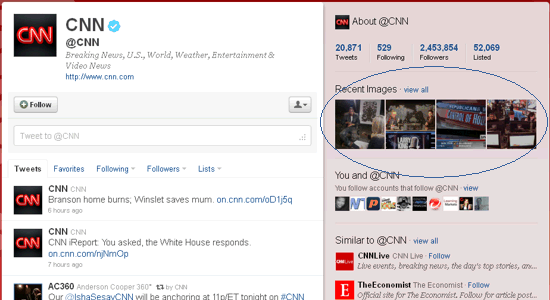
The profile shows 4 previews... https://twitter.com/#!/cnn

from the gallery page... https://twitter.com/#!/cnn/media/grid
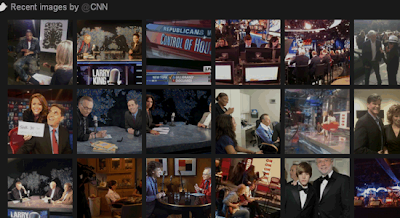
This is similar to what Facebook did long ago, showing a row of pictures at the top of user profiles. While Twitter says there's no way to control it, it seems the preview contains the 4 most recent pictures.
Now we'll see if people get as creative with the Twitter photo previews as they did with the Facebook photo previews.
One Great Security Advantage
Since Twitter allows you to upload a photo as part of any standard tweet, it eliminates the need to give third-party applications (twitpic, yfrog, img.ly, etc.) any access to your account. This is really fantastic because it eliminates any possibility of password theft or spamming your timeline.
You can access anyone's photo gallery either by clicking the link, or by adding "/media/grid" after their profile page address.
The profile shows 4 previews... https://twitter.com/#!/cnn
from the gallery page... https://twitter.com/#!/cnn/media/grid

This is similar to what Facebook did long ago, showing a row of pictures at the top of user profiles. While Twitter says there's no way to control it, it seems the preview contains the 4 most recent pictures.
Now we'll see if people get as creative with the Twitter photo previews as they did with the Facebook photo previews.
One Great Security Advantage
Since Twitter allows you to upload a photo as part of any standard tweet, it eliminates the need to give third-party applications (twitpic, yfrog, img.ly, etc.) any access to your account. This is really fantastic because it eliminates any possibility of password theft or spamming your timeline.
Wednesday, July 27, 2011
Six Basic Web Design Reminders
Here's a summary of some web design reminders that all webmasters should know, yet sometimes get overlooked in all the haste and details of building a website.
1) Design sites so they look and work properly on all browsers.
2) Design sites so they look and work properly at any resolution.
3) Be sure your sites still function and look right if a css call fails.
4) Be sure your sites still work when security-conscious users disable Java, Flash, scripting, etc. in their browsers.
5) Be sure your sites still look and work right if embedded objects fail (or are blocked per point #4 above). Don’t rely too heavily on plug-ins and widgets. Use trinkets sparingly for highlights, not the majority of basic content.
6) Keep your clients focused on their customers, not themselves. Gently remind them that the website isn't being built for their own amusement or to impress their buddies or competitors, but for their customers, future prospects, the public, or whatever the case really is.
1) Design sites so they look and work properly on all browsers.
2) Design sites so they look and work properly at any resolution.
3) Be sure your sites still function and look right if a css call fails.
4) Be sure your sites still work when security-conscious users disable Java, Flash, scripting, etc. in their browsers.
5) Be sure your sites still look and work right if embedded objects fail (or are blocked per point #4 above). Don’t rely too heavily on plug-ins and widgets. Use trinkets sparingly for highlights, not the majority of basic content.
6) Keep your clients focused on their customers, not themselves. Gently remind them that the website isn't being built for their own amusement or to impress their buddies or competitors, but for their customers, future prospects, the public, or whatever the case really is.
Saturday, May 7, 2011
Top-Ranking Success: Graywood Sporting
 This top-10 ranking web design is another site update. The company is a manufacturer's agent in Canada for sporting goods. (In other words, if you owned a sporting goods store and wanted to sell Winchester ammunition or SOG knives, you'd go through Graywood Sporting.)
The original website used detrimental text graphics in place of real text, the small amount of real text was Times Roman, every page was offset to the far left for no reason, everything was one shade of green upon green, and nothing was optimized for search engines to make any sense of.
Updates included centering pages, adding a custom background image, editing and formatting all the text, adding a plain text footer to every page, switching to plain text navigation links, SEO of every element from page titles to images, and updating the manufacturer, distributor, and sales contacts.
The redesign makes it cleaner, more colorful, and easier to read for visitors. And of course the real benefit to the client is a top-ranking website.
Subscribe to:
Posts (Atom)